All Recooty Articles, HR Tutorials and Tips
How to Post a Job on LinkedIn in 2026: Step-by-Step Guide Made Easy


 All Recooty Articles, HR Tutorials and Tips


LinkedIn job posting works best when you choose the right application route before you write the listing. Use the company Page, a standard title, clear pay and location details, and an application path your team can review promptly.
This guide covers the current posting steps, including LinkedIn’s AI-assisted drafting, screening questions, promotion, and external application options. If you also need to distribute a role to several free job posting sites, an AI ATS can keep the workflow in one place.

You will learn how to:
Follow the steps below to create the post, set the application route, and publish it with the correct company identity.
To begin your LinkedIn job posting journey:
Pro Tip: Make sure you’re logged into the correct company profile. If you’re a recruiter or admin, ensure your page role allows you to post on behalf of the company.
Once in the job dashboard, you’ll see two posting options:
LinkedIn now offers an AI-powered assistant that drafts job descriptions based on job titles. You can customize or approve its suggestions. It works great for saving time while still creating tailored listings.
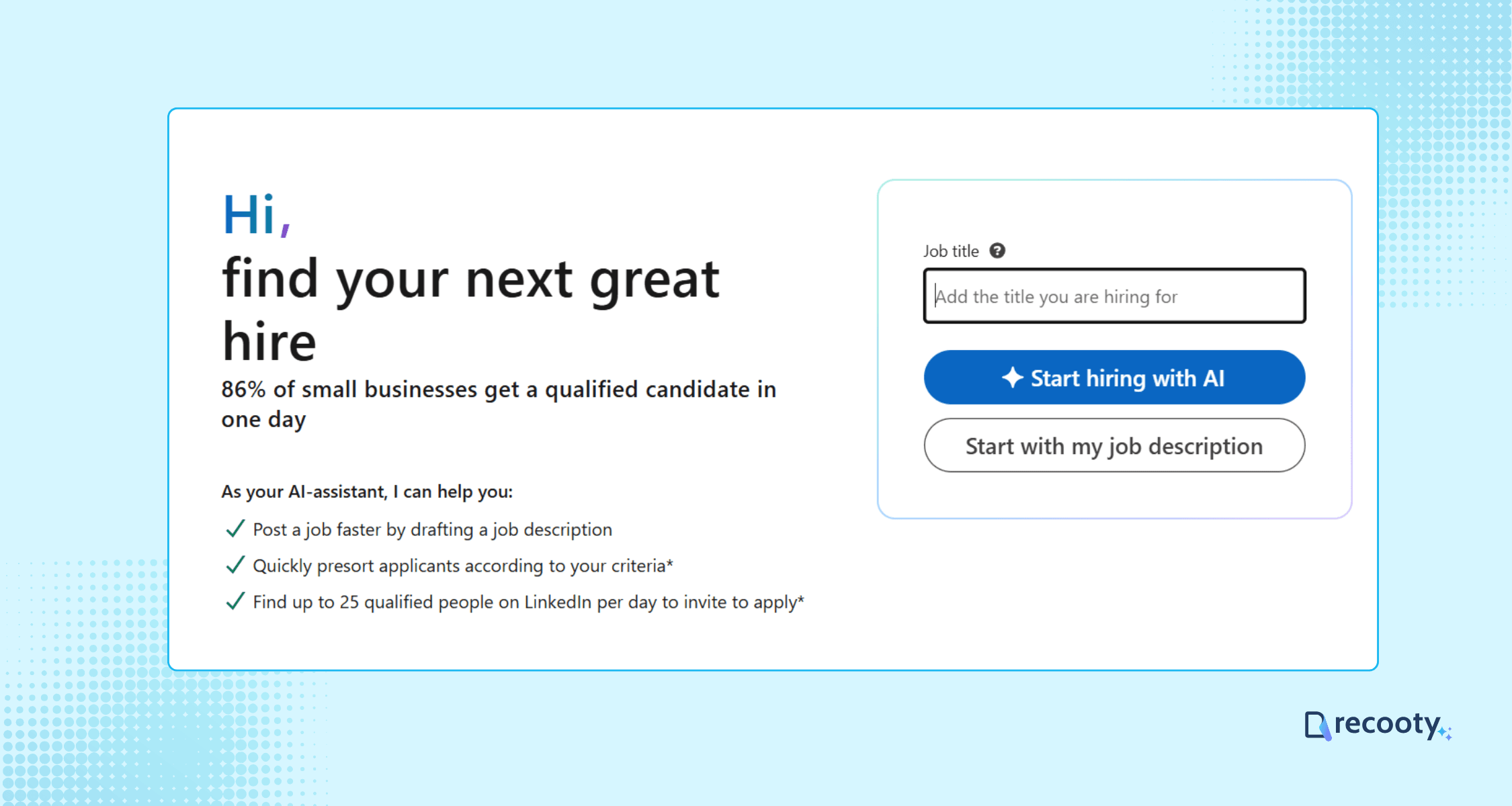
Prefer total control? You can build your job post step-by-step with fields like:
Use a standardized, searchable job title (e.g., “Marketing Manager” vs “Marketing Ninja”) to improve your listing’s search ranking.
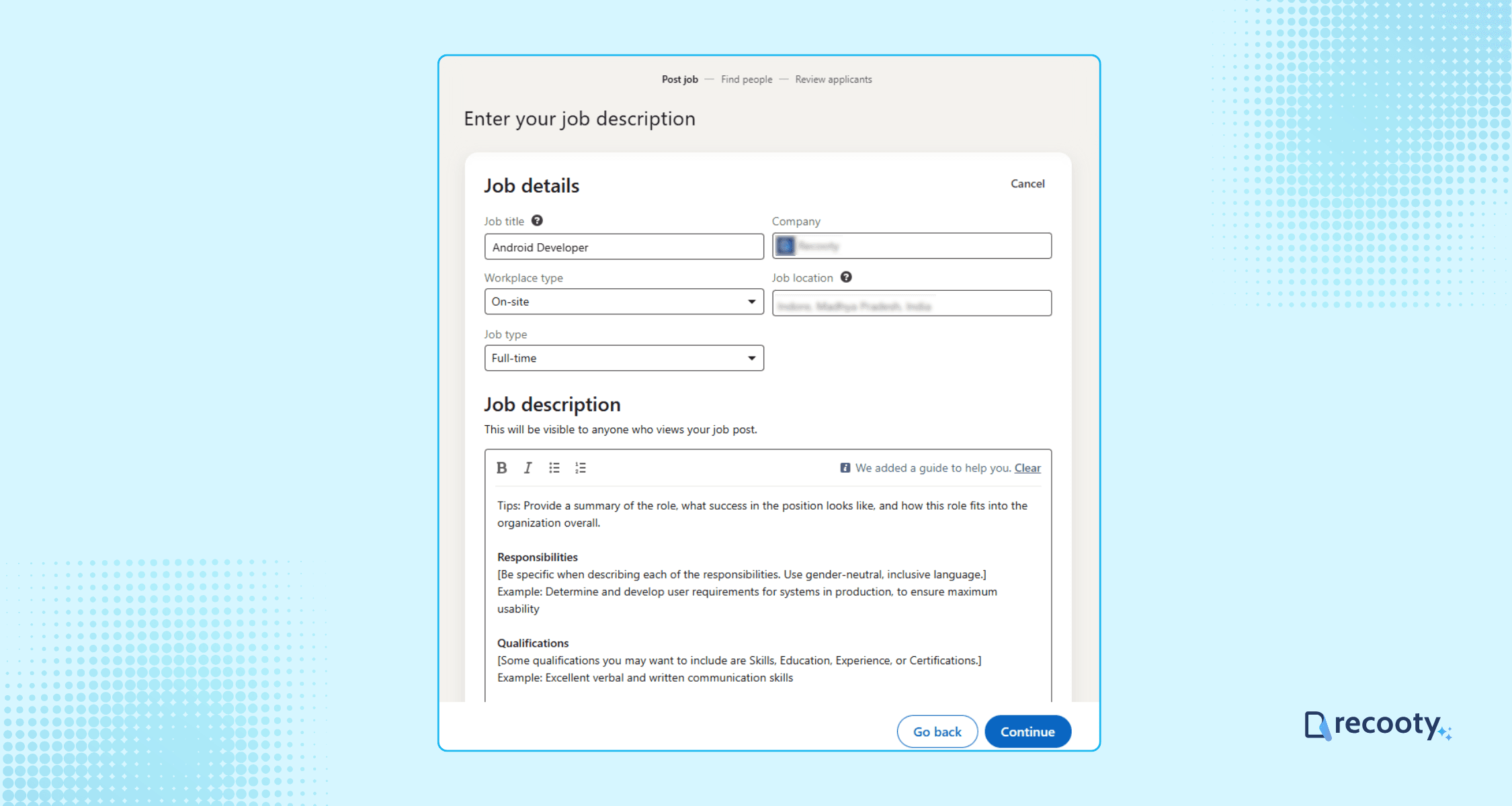
When creating a new role, LinkedIn prompts you to enter:
Why this matters:
Roles with clear location, work mode, salary, and benefits give candidates useful information before they apply.
Want to post a job on LinkedIn near a specific region? Accurately list “job location” to make it findable in “LinkedIn jobs near me” searches.
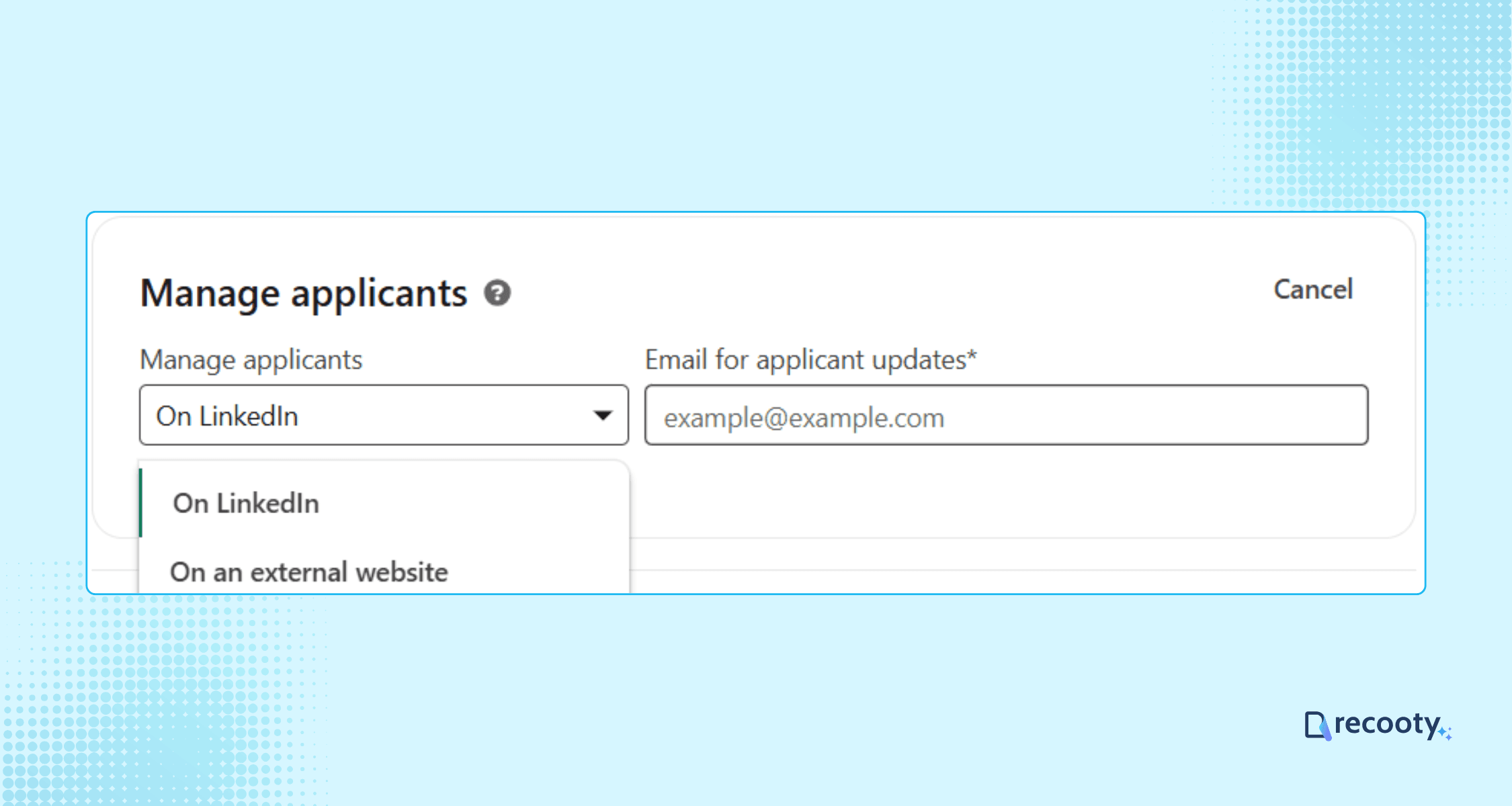
LinkedIn gives you two application methods:
Candidates apply using their LinkedIn profile. It’s fast and yields higher application rates. Best for entry-level or marketing roles.
Use this option to redirect candidates to your ATS or branded careers page. If you’re using Recooty, you can paste your unique application URL here.
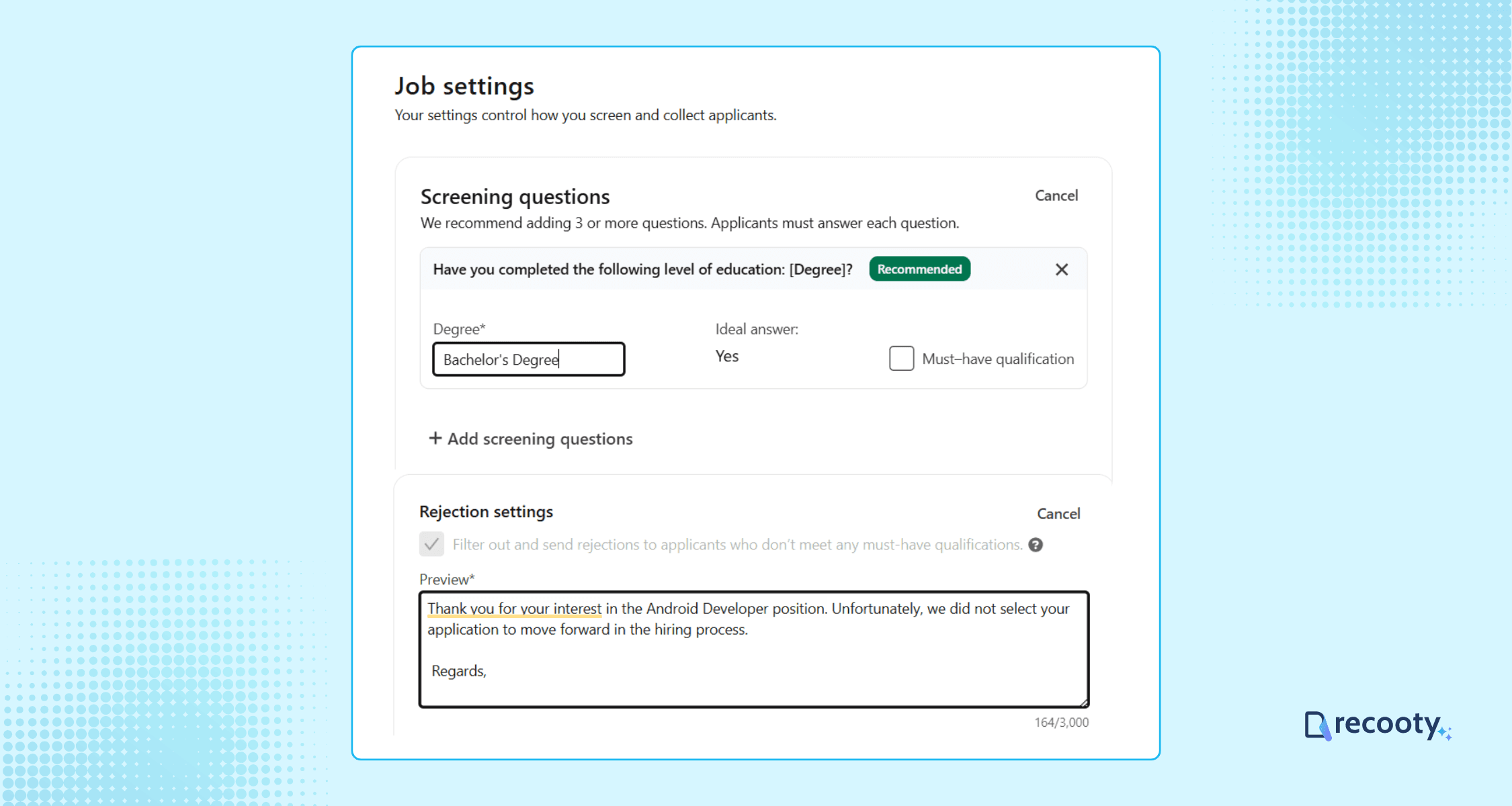
Screening questions help filter unqualified applicants. You can add:
Example: For a Software Engineer role, you could ask:
“How many years of experience do you have with React?”
“Do you have work authorization for the U.S.?”
These questions can help your team review the same evidence for every applicant.
Before going live:
Click “Post job for free” to make it public.
Once live, you can promote your job to improve reach.
Recommendation: Promote high-priority or hard-to-fill positions only after checking the listing and application path. Set a budget and a qualified-application target before you start.
Guide: Sponsored Job Best Practices
To boost visibility organically:
Free tip: Use Recooty to share your job automatically to 20+ free job posting sites like Glassdoor, Google Jobs, CareerJet, and more.
Learn more: Distribute Jobs 1-Click via Recooty
After launch, go to “Manage Jobs” under your LinkedIn Jobs tab.
Here you can:
Set aside regular time to review candidates, even for a free job post. A response deadline helps prevent strong applicants from waiting.
Your job post automatically expires after 30 days (for free postings). Before it does:
Post Management Guide: Managing and Closing Your Job Post
You can post 1 free job at a time using a personal or admin LinkedIn account
Tools such as Recooty can handle job distribution from one dashboard. They can help teams:
Pricing and product terms vary, so confirm the current offer before budgeting for an ATS.
After you create the post, use the customization options to make the role easier to find and easier to assess. These changes should match the work, location, and application process.
Your job title affects your visibility in search results more than any other field.
Example: A standard title such as “Marketing Manager, Brand Strategy” is easier to search than an internal title such as “Brand Evangelist.”
🔗 Reference: LinkedIn job title optimization best practices
Write the job description in clear language. Start with the role’s purpose, then explain the work, requirements, and expected outcomes.
Bonus: Include a note from the hiring manager or a “What success looks like at 90 days” section.
Screening questions help you check job-related requirements such as experience, work location, or eligibility.
Tip: Use LinkedIn’s built-in filters or link with a tool like Recooty to centralize your pipeline.
For a U.S.-based remote role, relevant questions might include:
You can use LinkedIn Easy Apply or send applicants to an external application link. Choose the route your team can monitor and where the full assessment can be completed.
Set up your own branded careers page using Recooty, with your logo, description, and listing controls.
Write for the person you want to hire. Use a tone that suits the role while keeping the requirements and work arrangement clear.
For example, explain what remote work means for meetings, working hours, and time-zone overlap.
Don’t just rely on LinkedIn’s algorithm.
Track which sharing channels produce qualified applications so you can repeat the useful ones.
Want to show up in searches like “LinkedIn jobs near me”? You need to optimize the job location and remote/hybrid settings.
Ideal format: “Remote (Timezone: GMT+5 to GMT+8 encouraged)”
LinkedIn posts can be delayed, rejected, hidden from search, or disconnected from an external application page. The checks below help you identify the cause before spending more on promotion.
If your job post is not appearing in relevant searches, check the title, location, company Page, job status, and visibility settings first.
Posts can remain in review when keywords, formatting, or missing fields trigger LinkedIn’s moderation flow.
If approval takes more than 24 hours, check LinkedIn’s Job Posting Help Center.
Yes, LinkedIn can reject a post when the listing includes restricted language, unsupported claims, or other policy issues.
See compliance policies here: Job Posting Policy Guide
Edit suggestion: Instead of “Join our exciting & young team,” say “Join a fast-paced, collaborative environment focused on innovation.”
Many ask “How many free jobs can you post on LinkedIn in a month?” The answer: One active free job post at a time per company profile.
You need the correct Page permissions to post under a company profile.
A sponsorship campaign can pause when the payment method fails or the promotion budget is reached.
Need help? Use LinkedIn’s Ad Billing Help Center.
Note: Sponsored pricing varies with location, competition, and marketplace activity. Review the budget shown in your account before launch.
If you’re using Recooty or another ATS, test the external apply page before sharing the job.
Recooty lets you customize apply pages through a Custom Career Page.
Trying to quickly change a remote tag or title variation? Here’s what can go wrong.
Learn how: Editing and Duplicating Jobs on LinkedIn
Recooty can distribute jobs to LinkedIn, Google Jobs, and other channels from one dashboard.
Explore how Recooty simplifies job posts and avoids technical issues: Start Posting Smarter
The route you choose affects visibility, cost, and where applications are reviewed. Direct posting suits one eligible role, promotion buys additional reach, and an ATS can return applications to one hiring pipeline.
| Route | Best fit | Current limitation or cost signal | What to measure |
|---|---|---|---|
| Free LinkedIn job | One eligible role with moderate demand | One active free post, up to 14 days before pause, and a role-dependent application cap | Qualified applications and response time |
| Promoted LinkedIn job | Urgent, competitive, or underexposed role | Dynamic pay-per-click budget based on market factors | Cost per qualified applicant and hire rate |
| LinkedIn Apply through ATS | Teams that need applications returned to one pipeline | Basic jobs can have an on-site LinkedIn Apply cap before external applications are used | Apply completion, source accuracy, and stage conversion |
| Job slots or Recruiter product | Recurring or high-volume hiring | Contract or product terms vary by account | Cost per role, recruiter capacity, and time to fill |
LinkedIn’s current free-job help page says a free job must be associated with the company’s LinkedIn Page and becomes less visible over time. Its pricing guidance explains that promoted pricing changes with marketplace activity and that the job can pause when the total budget is reached.
Start with the free route when the role can tolerate limited visibility and a short review window. If you need more applicants, check the job description, compensation, location, and application path before paying for promotion. An ATS is useful when several reviewers or job boards need one scorecard and source report.
Before publishing or promoting, check the details that influence discoverability and candidate trust:
LinkedIn’s current help content says a free post can pause after 14 days and that application limits can vary by role. Check the post from a candidate view so the application route remains clear after the visibility window or LinkedIn Apply cap changes.
LinkedIn’s Apply Connect documentation says basic jobs can collect LinkedIn Apply submissions and send completed applications to an ATS in real time. After the on-site limit is reached, LinkedIn Apply can be disabled and candidates may be redirected to the external career site. Confirm this behavior before promising a fully native application experience.
| Handoff check | Question to answer before launch |
|---|---|
| Canonical job record | Does LinkedIn or the ATS own the title, location, salary, and status? |
| Application destination | Do candidates apply on LinkedIn, on the career site, or through both routes? |
| Source attribution | Will the ATS preserve LinkedIn as the original source and distinguish free from promoted? |
| Screening | Are LinkedIn questions and ATS questions consistent and job-related? |
| Cap and fallback | What happens when LinkedIn Apply reaches its role-specific limit? |
| Closure | Does closing the ATS role also close or update the LinkedIn post? |
Use Recooty’s applicant tracking system as the internal workflow link, and compare the requirements with how to choose the right recruitment software. For employer-brand consistency, link the listing to how to create a career page that converts.
Choose the posting route that fits the role, write the listing around real requirements, and test the application path before launch. Monitor free-post limits or promotion spend, keep LinkedIn and the ATS in sync, and judge the channel by qualified applicants and hires.
Eligible employers can usually post one free job at a time. LinkedIn’s current help page says the free post can remain active for up to 14 days before it pauses, can close after 30 days if it is not promoted, and is subject to application and 30-day posting limits. Some employers or roles may be required to promote or verify their identity.
Promoted jobs use dynamic pay-per-click pricing. LinkedIn recommends a budget based on factors such as title, location, industry, competition, and marketplace activity. Review the budget in your account instead of relying on an old fixed daily estimate.
LinkedIn may pause a free post after its visibility window or application limit is reached. The job can also be affected by eligibility rules, high-demand role restrictions, or reposting the same title and company too soon. Check the job dashboard for the specific status and next action.
Yes, eligible integrations can post Basic jobs and return LinkedIn Apply submissions to the ATS. Confirm the applicant cap, fallback to the external career site, source attribution, and close or update behavior before relying on the integration for a high-volume role.
Use Easy Apply when a short, mobile-friendly application and fast review are realistic. Use an ATS or branded career page when the role needs a longer assessment, document collection, structured workflow, or shared hiring review. The best option is the one your team can monitor and respond to consistently.
LinkedIn limits free reposting. Its current help content says reposting the same job title and company within seven days requires promotion, and free-post limits still apply. Close or update the existing role rather than creating near-duplicate listings to force visibility.
Source: https://recooty.com/blog/how-to-post-a-job-on-linkedin/

Hardik Vishwakarma – AI Recruitment Strategist | HR Automation Expert | Applicant Tracking Software Specialist Hardik Vishwakarma is a recognized leader in HR automation and...
View Full Profile →