



Key takeaways
- ZipRecruiter currently offers a free trial for new employers, then moves to flexible plans that may use monthly job slots or pay-per-day pricing. The live quote matters more than old fixed prices.
- One post can be distributed to 100+ job sites, while ZipRecruiter matching can invite relevant candidates and the dashboard can manage and rate applicants.
- Premium and Pro features can add sponsored visibility, the Resume Database, TrafficBoost, and ATS integrations. Choose them only when the role, geography, and hiring deadline justify the extra reach.
- Recruitment software is useful when you need one source of truth for applicants, consistent screening, source tracking, and distribution beyond ZipRecruiter.
- For a clean test, record qualified applicants, time to first qualified applicant, interview rate, hire rate, cost per qualified applicant, and recruiter time. Total applications alone can hide poor fit.
ZipRecruiter combines job distribution, candidate matching, and applicant review. This guide shows how to publish directly or through an Applicant Tracking System (ATS), then choose a plan based on the role and the results you need.
One post can reach more than 100 partner sites, but distribution alone does not guarantee qualified applicants. Keep the title, pay, location, and application path clear before increasing reach.
How to Post a Job on ZipRecruiter
To post a job ad on ZipRecruiter, there are two methods available:
Option 1: Post a Job on ZipRecruiter using Recooty

If you’re looking for an even easier way, consider using an ATS like Recooty.
Recooty enables you to post jobs on ZipRecruiter and numerous other premium job boards, including LinkedIn, Indeed, and more, with just a single click.
It also centralizes your recruitment workflow, making it easier to manage candidates and track your hiring progress efficiently.
Option 2: Post a Job directly on ZipRecruiter
To post a job listing directly on ZipRecruiter, follow these steps:
Step 1: Visit the ZipRecruiter Post a Job Page
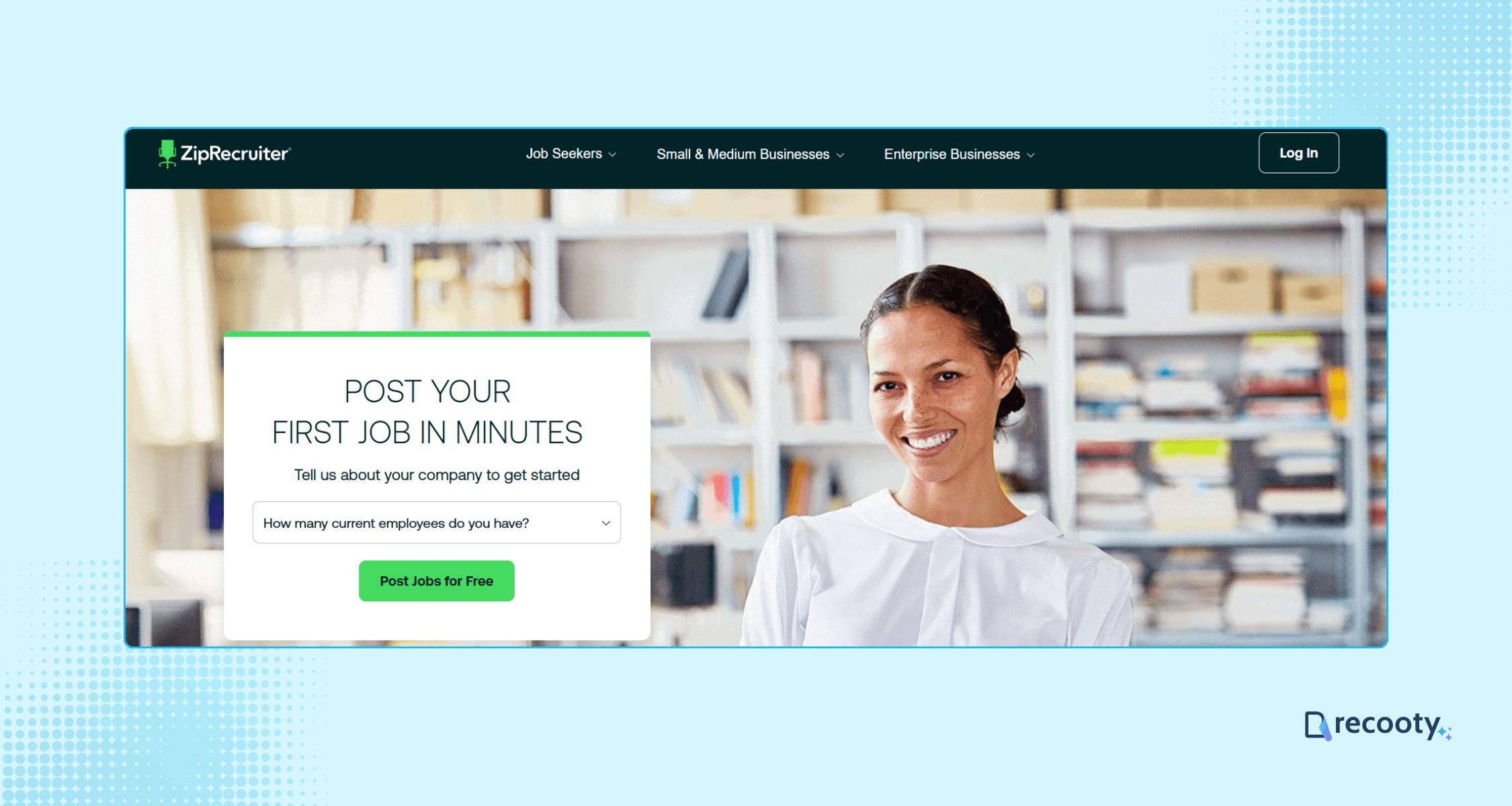
Navigate to the ZipRecruiter post a job page.
Click on “Post Jobs for Free” and select your company size from the dropdown menu.
Step 2: Create an Employer Account
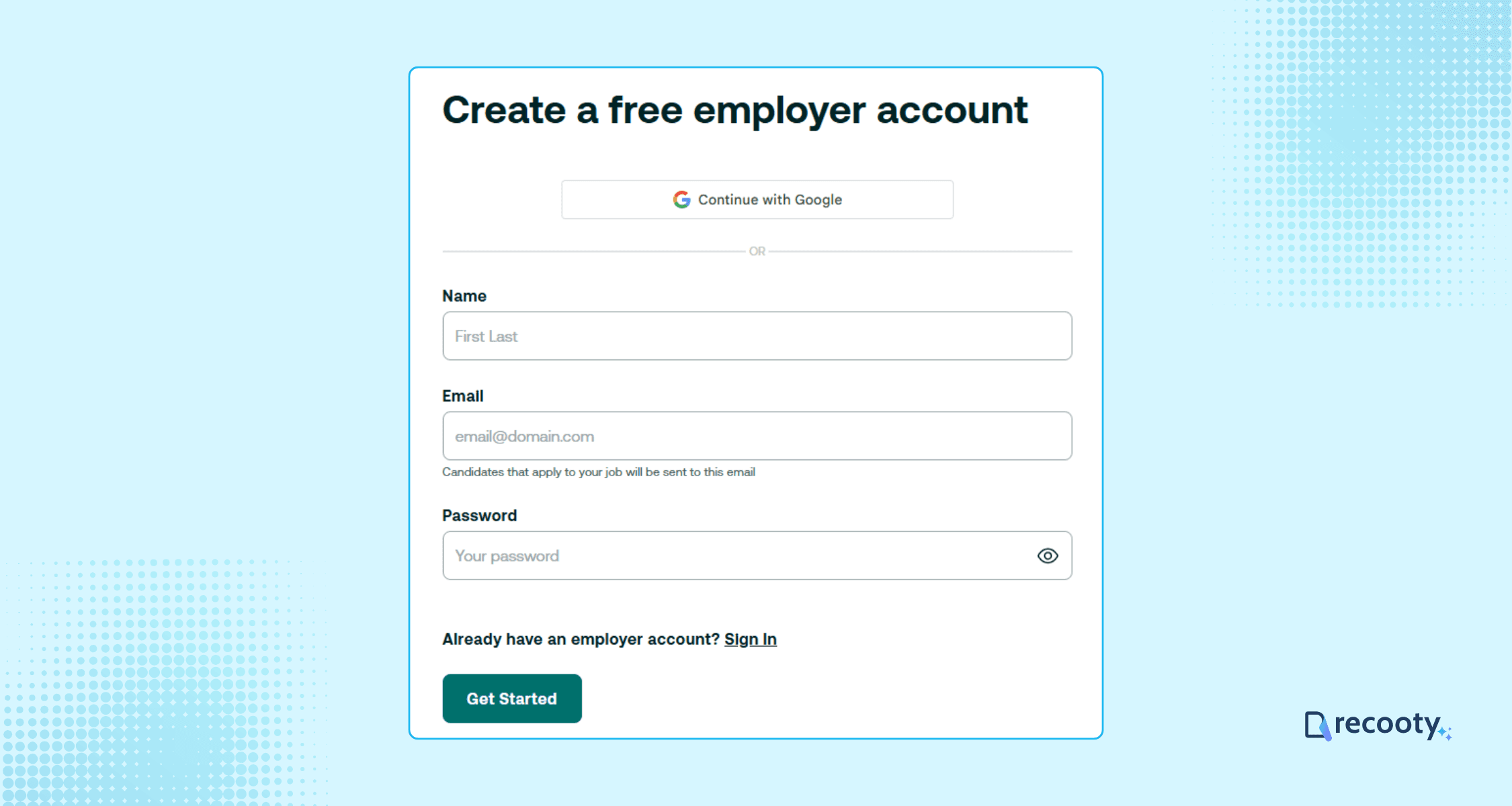
Enter your name, email, and a secure password.

Fill in critical company details, including company name, company website, zip code, your current title, and phone number.
Finalize your details by answering some basic questions, such as how many people you want to hire and other similar questions.
Step 3: Begin Creating Your Job Posting
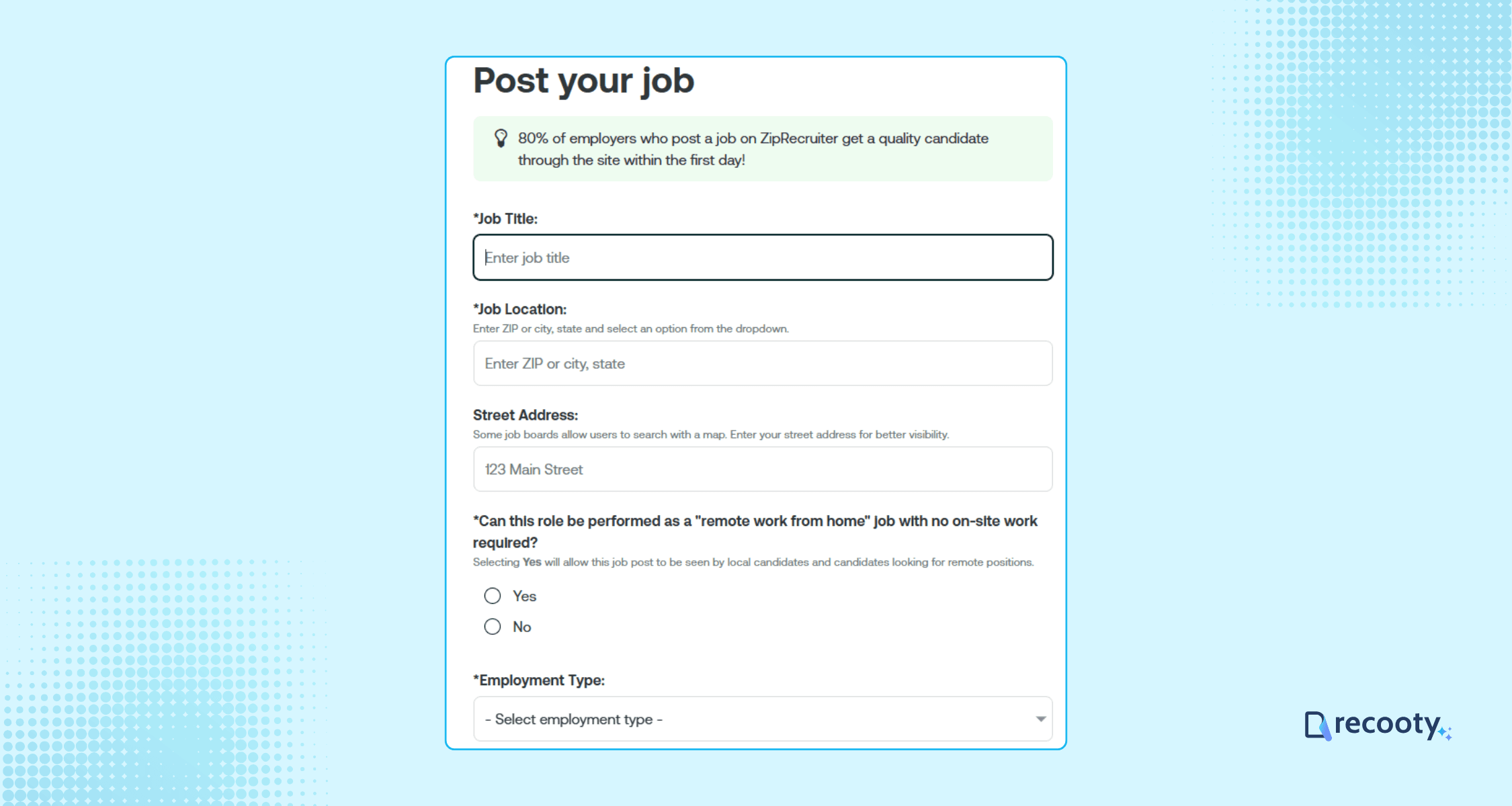
Input essential information such as job title, location, and employment type.

Craft a captivating job description that highlights key expectations and entices potential candidates.
Use ZipRecruiter’s customizable templates or our templates library of job descriptions to tailor your post according to your needs.
You can also use Recooty’s free AI job description generator for optimized and bias-free job descriptions.
Be sure to include a captivating pitch that highlights the reasons why candidates should consider your employer brand, and keep it concise at 140 characters or less.

Choose benefits options from medical insurance to life insurance based on what’s applicable.
Offer a compensation range: ZipRecruiter provides insights into typical salaries for your position in your specific location.
Click “Save & Continue” once done.
Step 4: Select a Plan, Make a Payment, and Post Your Job
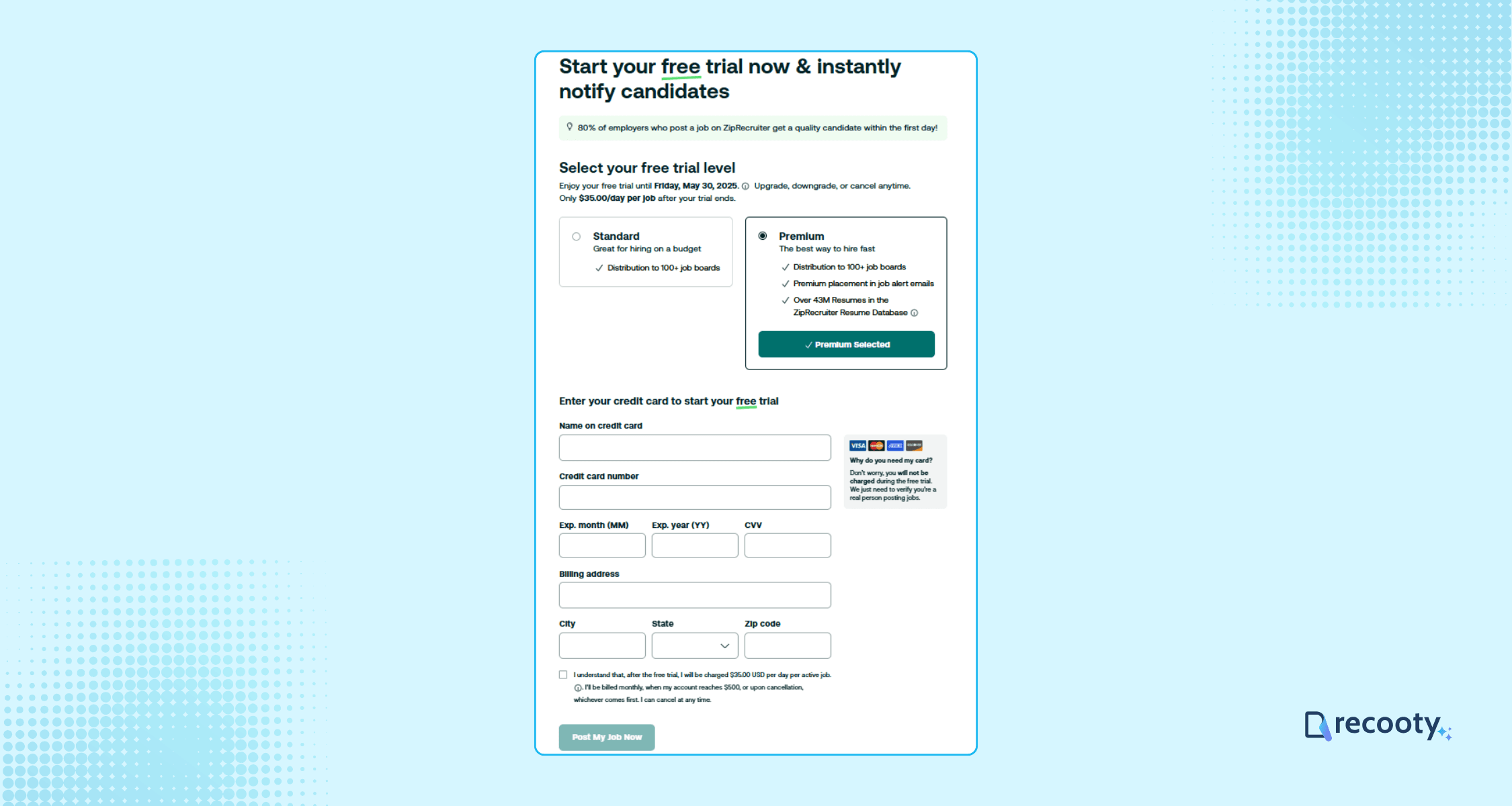
Choose from the Standard or Premium plans, or contact ZipRecruiter to inquire about the Pro plan if you need additional features.
Fill in payment details, and click “Post My Job Now” to launch your listing.
Remember, you can take advantage of a 2-day free trial!
Pricing of Posting a Job on ZipRecruiter
ZipRecruiter offers three plans tailored to different hiring needs:
1. Standard Plan: Ideal for users with a limited budget, facilitating postings across 100+ partner job boards and includes a 2-day free trial, costing $24/job/day.
2. Premium Plan: Designed for broader reach and effective placements, it includes access to a database of 45 million resumes, costing $35/job/day.
3. Pro Plan: For larger organizations, offering enhanced features like TrafficBoost, contact ZipRecruiter for pricing details.
Best recruitment software for ZipRecruiter job posting: when to use an ATS
The best recruitment software for ZipRecruiter depends on whether you need a single job ad or a repeatable hiring system. ZipRecruiter can handle distribution and applicant review on its own. An ATS becomes more valuable when several people need to collaborate, candidates arrive from multiple channels, or you need a defensible record of every hiring decision.
ZipRecruiter pricing and free trial: what is current
The live ZipRecruiter employer pages now describe a fully loaded free trial for new employers, followed by flexible pricing that can include monthly subscriptions with customizable job slots or pay-per-day options. They do not present the old $24 per job per day and $35 per job per day figures above as a universal current quote. Treat those figures as historical examples and confirm the actual offer in the employer dashboard before publishing.
The current plan page describes Standard, Premium, and Pro as different reach and workflow levels. Standard includes a dashboard, one-click distribution to 100+ job boards, and AI-assisted candidate outreach. Premium adds sponsored visibility and access to a Resume Database with more than 56 million profiles. Pro adds TrafficBoost and integration with several applicant tracking systems. See the current ZipRecruiter plans and employer posting page for the offer available to your company.
| Hiring situation | Practical route | What to measure before upgrading |
|---|---|---|
| One urgent role and no ATS | Start with the free trial or Standard option, then manage applicants in ZipRecruiter | Time to first qualified applicant and qualified applicant rate |
| Hard-to-fill role with a clear budget | Test Premium or Pro visibility for one role and one location | Cost per qualified applicant and interview rate |
| Several open roles or multiple recruiters | Publish from an ATS or connect the ATS where supported | Duplicate records, recruiter hours, source-to-hire rate, and hiring-manager response time |
| Hiring across boards and an owned careers page | Use an ATS as the system of record and ZipRecruiter as one acquisition channel | Channel-level conversion from apply to hire |
ZipRecruiter says that 4 out of 5 employers who post receive a quality candidate within the first day, and its plan page says paid jobs receive 9 times more applicants than organic jobs on average. These are platform-reported figures, not a guarantee for every role. Use them as hypotheses to test, and compare qualified outcomes rather than raw applicant volume.
How to post a job on ZipRecruiter without losing source data
Use this short publishing checklist after the account and payment steps in the guide above:
- Use the title a qualified candidate would actually search for. Avoid internal titles such as “rockstar” or “ninja” unless they are also explained in plain language.
- Put the pay range, work arrangement, location, employment type, and required experience near the top of the description.
- Add only screening questions that change the decision. Questions that do not affect the shortlist add friction and can reduce completion.
- Keep a source tag for ZipRecruiter, the campaign or plan, role, location, and posting date. If an ATS is connected, confirm that this information passes into the candidate record.
- Close or pause the job when the role is filled. A stale listing can waste spend and create a poor candidate experience.
- Review a sample of applicants for fit before increasing the budget. More distribution cannot repair an unclear job description or an unrealistic requirement.
ZipRecruiter versus an ATS: which workflow fits?
ZipRecruiter is the acquisition and matching layer. An ATS is the workflow and evidence layer. They can work together, but they answer different operational questions.
| Question | ZipRecruiter dashboard | ATS connected to ZipRecruiter |
|---|---|---|
| Where can we reach candidates? | ZipRecruiter and its distribution network | ZipRecruiter plus other boards, careers page, referrals, and tracked sources |
| Where do we review applicants? | A single ZipRecruiter workspace | A shared pipeline with stages, owners, notes, and hiring-manager access |
| How do we compare channels? | Platform-level results | Consistent source, stage, interview, offer, and hire reporting |
| How do we protect process consistency? | Screening questions and ratings | Structured scorecards, permissions, templates, and audit history |
| When is the simpler route better? | One or two roles with one recruiter | Repeated hiring, multiple locations, or more than one decision-maker |
A current recruitment platform comparison places ZipRecruiter among platforms built around reach, templates, matching, and job-board distribution, while describing broader ATS products such as Freshteam, Zoho Recruit, and Workable as stronger on workflow customization and analytics. Use ZipRecruiter for candidate acquisition, but keep recruitment software as the workflow system when your team needs shared stages and reporting.
Check the funnel before buying more reach
Diagnose the funnel in this order: job-post clarity, applicant quality, screening completion, interview conversion, and offer acceptance. If qualified applicants are low, improve the title, pay transparency, location, requirements, and screening questions before paying for more exposure. If qualified applicants are healthy but recruiters lose track of them, connect recruitment software before adding another job board.
For internal guidance, compare this workflow with how to choose the right recruitment software, how to post a job on Indeed, and how to post a job on LinkedIn. If you are creating the listing from scratch, use the free AI job description generator and then review the output for accuracy and inclusive language.
A practical ZipRecruiter publishing decision
ZipRecruiter can fit a team that needs broad distribution and a simple applicant workspace. Its matching and plan features are most useful when they improve qualified progress for the specific role.
- Advanced AI matching features that connect you with top candidates.
- Extensive job reach through partnerships with over 100 job boards.
- An expansive database of over 45 million resumes.
- Customizable options to invite candidates to apply directly.
More Resources on Job Posting
- How to post a job on Monster
- How to post a job on CareerBuilder
- How to Post a Job on Google for Jobs Search Engine
- How to Post a Job on LinkedIn
- How to Post a Job On Craigslist
- How to Post a Job on Dice
- How to Post a Job on Indeed
- How to Post a Job on Snagajob
- How to Post a Job on Dribbble
- How to Post a Job on Seek
- How to Post a Job on Jobserve
- How to post a job on Glassdoor
- How to Post a Job on Trovit
- How to post a job on Jooble
- How to Post Jobs on Juju.com
- How to Post a Job on TotalJobs
- How to post a job on Behance
- How to Post A Job on AngelList Talent (now Wellfound)
- How to Post a Job on JobSquare
Frequently Asked Questions
New employers may receive a fully loaded free trial. After the trial, the employer chooses a plan or package, so “free” means a trial rather than a permanent free posting tier.
ZipRecruiter presents flexible pricing, including monthly subscriptions with job slots and pay-per-day options. Check the live employer quote rather than relying on historical prices.
ZipRecruiter says one post can be distributed to more than 100 job sites, including Google Jobs and niche boards. Distribution does not guarantee equal visibility or applicant quality on every site.
Yes. ZipRecruiter’s current Pro plan describes integrations with several ATS products, and its partner documentation includes APIs and feeds for creating, updating, and closing listings. Confirm the supported integration and applicant handoff before committing.
It can suit a small business that needs broad distribution and a simple applicant dashboard. An ATS may be a better investment when hiring is recurring, several people review candidates, or the business needs source-to-hire reporting.
Track qualified applicants, time to first qualified applicant, interview rate, offer rate, hire rate, cost per qualified applicant, and recruiter time. Compare the same role and geography across channels before increasing spend.
Can I post on ZipRecruiter for free?
Yes, with ZipRecruiter’s 2-day free trial, you can post a single job without any cost.
How much does it cost to post a job on ZipRecruiter?
Pricing starts at $24/job/day and can go up to $35/job/day depending on your plan. For further details, it’s best to reach out to their sales team.
How long does my job post stay live on ZipRecruiter?
Your job post remains active as long as you maintain your subscription or until you manually close the job. Free trial posts are live for two days.
Can I edit or remove my job posting after it’s live?
Yes, you can edit job details or remove your posting at any time through your employer dashboard.
Is there a way to post jobs to ZipRecruiter and multiple other job boards at once?
Yes, Recooty allows you to post a job to ZipRecruiter and many other premium boards (such as LinkedIn, Indeed, and Glassdoor) with a single click. These tools can streamline your hiring process and maximize your job’s reach across multiple sites.
Source: https://recooty.com/blog/how-to-post-a-job-on-ziprecruiter/
Jump To Section
Author's Profile

Hardik Vishwakarma


Hardik Vishwakarma – AI Recruitment Strategist | HR Automation Expert | Applicant Tracking Software Specialist Hardik Vishwakarma is a recognized leader in HR automation and...
View Full Profile →