Recooty MCP Server: Connect AI to Your ATS
Set up the Recooty MCP server to connect ChatGPT, Claude or any MCP client to your ATS, with the available tools and authentication explained.

CONTENTS
- 00Introduction
- 01Here’s what you can do with Recooty MCP:
- Hiring locations & Departments
- Job postings
- Job distribution
- Candidate screening and ranking
- Hiring pipeline management
- Hiring content it can write or improve
- Example requests you can give it
- 02The copy-paste tax nobody talks about
- 03What is the Recooty MCP Server?
- 04How does the Recooty MCP Server work?
- Read actions versus write actions
- 05What can you actually do with it?
- Create job openings in natural language
- Generate and rewrite job descriptions
- Manage hiring departments
- View hiring locations
- List existing job openings
- Generate supporting hiring content
- Post to 250+ job boards in one action
- AI candidate screening and ranking
- Manage your live hiring pipeline
- 06What can you ask about your candidate pipeline?
- 07Why an MCP server instead of a plugin?
- 08Who should use this?
- 09Is the Recooty MCP Server secure?
- 10Where this fits with the rest of your stack
- 11What conversational recruiting actually changes
- 12Frequently asked questions
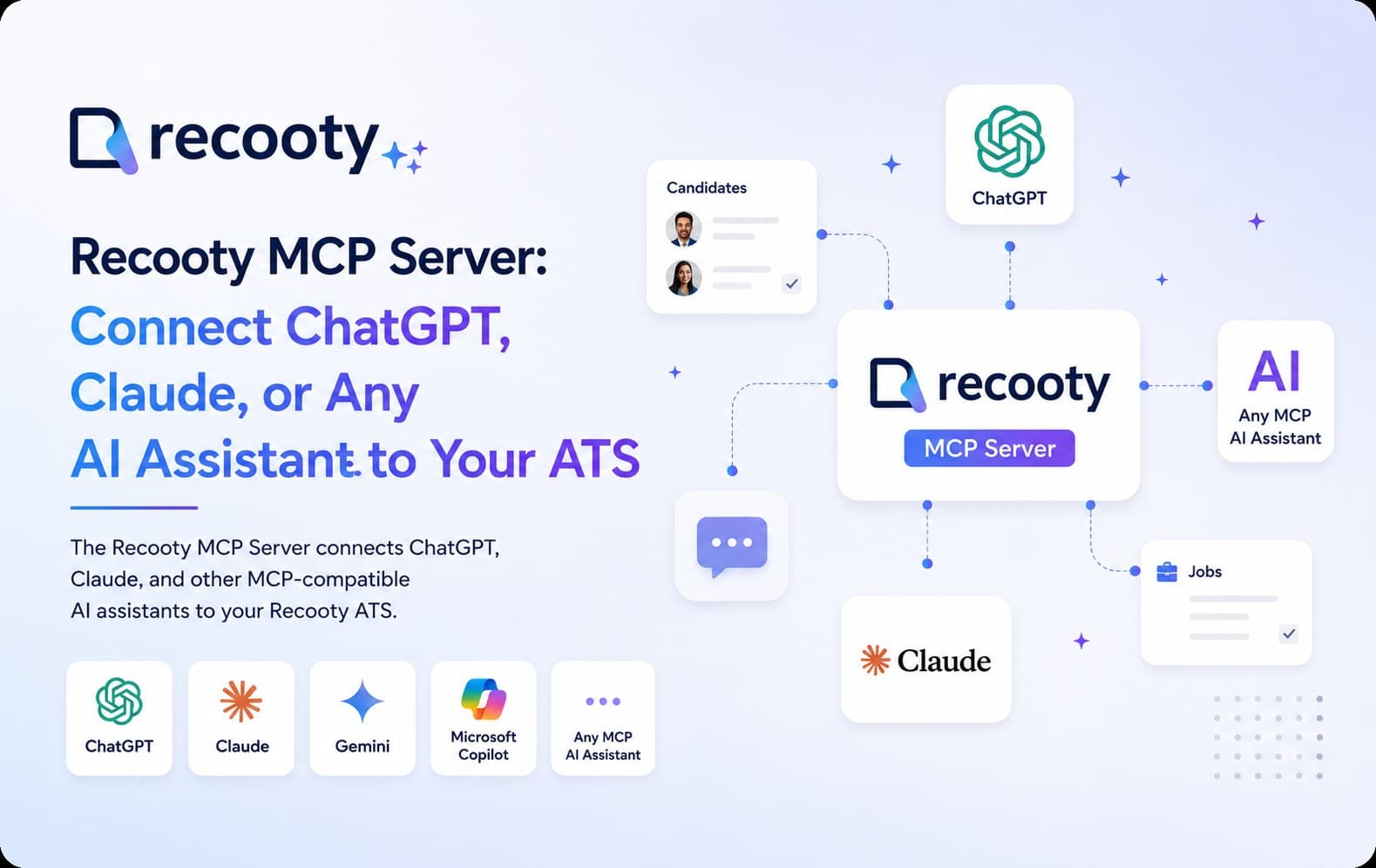
The Recooty MCP Server connects AI assistants like ChatGPT or Claude directly to your Recooty account, letting you manage hiring through simple conversations.
For a current comparison, see this guide to AI-powered applicant tracking systems.
You can create job openings, publish them to 250+ job boards, screen and rank candidates with AI, query your live hiring pipeline, check scheduled interviews, and move candidates between hiring rounds. Every write action waits for your approval before it runs.
Here’s what you can do with Recooty MCP:
Hiring locations & Departments
- List all your hiring locations and existing departments.
- Create a new hiring locations, and departments after you approve the details.
Job postings
- List your recent job postings.
- Create a new job posting, including:
- Job title
- Complete job description
- Location, set to on-site, hybrid, or remote
- Employment type
- Experience level
- Department
- Industry
- Salary range
- Draft or published status
Before any job gets created, the assistant will always:
- Check your available locations and departments.
- Show you the complete job posting for review.
- Wait for your approval before creating it.
Job distribution
- Publish an approved job to 250+ job boards in one action, including LinkedIn, Indeed, Google for Jobs, Glassdoor, Monster, Naukri, Talent.com, Jooble, Careerjet, and Remotive.
- Push a draft live, or pull a live posting back to draft.
- Check which boards a given role went out to.
Candidate screening and ranking
- Screen incoming applicants against the job description automatically.
- Rank candidates with AI scoring based on skills, experience, and role fit.
- Surface AI-generated candidate summaries so you are not opening twenty resumes to find three.
- Filter a candidate pool by experience, current or past employer, location, or skill.
Hiring pipeline management
- List candidates at any stage of any job.
- Check which interviews are scheduled, by day and by location.
- Shortlist or advance named candidates to the next round, after you confirm.
- See who has cleared a specific interview round for a specific role.
Hiring content it can write or improve
- SEO-optimized job descriptions
- Inclusive job descriptions
- AI-generated job descriptions
- Hiring requirements
- Responsibilities and qualifications
- Interview questions
- Candidate evaluation scorecards
- Employer branding copy
Example requests you can give it
- "Show me all my active job postings."
- "Create a remote Senior React Developer job in draft."
- "Write a job description for a Sales Executive."
- "Publish the Senior React Developer role to all 250+ job boards."
- "Can you filter out the top 3 candidates for the ML Engineer job role in the San Francisco location?"
- "Filter out the candidates who have 4+ years of experience at Meta from all the marketing related job posts I had created."
- "Tell me what interviews are scheduled for today for the New York location."
- "Shortlist Michael Doe and Ellie Abraham for the next round for the Marketing Manager job role."
- "Give me the list of all the candidates who have cleared the 2nd round of interview for the Network Engineer job role."
That is the whole surface area. Now I want to describe the specific problem it solves, because it is not the one most people expect.
The copy-paste tax nobody talks about
My AI assistant has been useful for months. It writes job descriptions, drafts outreach emails, and builds interview scorecards on request.
But it could never see my actual hiring data. Not one job, not one department, not one location.
So every request turned into the same routine. I would open my ATS, find what I needed, copy it out, paste it into a chat window, explain the context, get an answer, then go back to the ATS and manually enter the result.
I was the integration. I was the API between two systems that had no idea the other existed.
Multiply that by fifteen open roles and it stops being a minor annoyance. It becomes a few hours a week spent on data ferrying that produces nothing.
What is the Recooty MCP Server?
The Recooty MCP Server is an integration layer that lets an AI assistant talk directly to your Recooty workspace using the Model Context Protocol.
MCP is an open standard for connecting AI assistants to external tools and data. Any assistant that supports it, including ChatGPT and Claude, can use the same connection.
That word "any" matters more than it sounds. You are not locked into a single vendor's chat product. If your team standardizes on a different assistant next year, the connection follows you.
Once it is live, you type a request in plain language and the assistant converts it into a real action inside your Recooty account. No exports, no tab switching, no re-typing.
How does the Recooty MCP Server work?
The connection runs on secure authentication, and the assistant can only perform the actions you have authorized.
Here is what happens when I ask for something specific. I type: "Create a remote Frontend Developer job."
The assistant then does the following:
- Checks the departments that exist in my account.
- Verifies my available hiring locations.
- Asks me for anything missing, like experience level or salary band.
- Generates a full job description if I want one.
- Shows me the complete posting for review.
- Waits for my explicit approval.
- Creates the job inside Recooty.
Step six is the one I care about most. Nothing gets written to my account until I say yes.
That approval-first design is what makes this usable on real hiring data rather than a sandbox. AI assistants are confident, and confidence without a confirmation step is how you end up with a published job listing that says "Senior Softwre Engineer."
Read actions versus write actions
Not every request needs the same level of caution, and the server treats them differently.
| Request type | Example | What happens |
|---|---|---|
| Read | "List all active jobs" | Returns the data immediately |
| Read | "Show my hiring locations" | Returns the data immediately |
| Read | "Top 3 candidates for the ML Engineer role" | Returns a ranked shortlist immediately |
| Read | "What interviews are scheduled today?" | Returns the schedule immediately |
| Write | "Create a Sales department" | Confirms with you first |
| Write | "Create a Product Manager job" | Shows a full draft, then confirms |
| Write | "Publish this role to all job boards" | Confirms before distribution |
| Write | "Shortlist Michael Doe for the next round" | Names the candidate and stage, then confirms |
Reads are instant because they are reversible. Writes pause because they are not.
What can you actually do with it?
Six things, in practice. I use all of them, though not equally.
01Create job openings in natural language
Creating a job used to mean working through a form with a dozen fields.
Now I describe the role and the assistant assembles the posting: title, employment type, work location, department, industry, experience level, salary range, and the full description.
I review it, adjust whatever is off, and approve. The whole thing takes under two minutes for a role I would otherwise have spent twenty on.
02Generate and rewrite job descriptions
Writing a good JD is slow work, and most people give up halfway and ship something generic.
The assistant produces SEO-friendly descriptions with inclusive language, a responsibilities section, required skills and qualifications, preferred experience, a company overview, and benefits.
It also rewrites existing ones. If a role has been open for six weeks with weak applicant flow, the JD is usually part of the problem, and the fastest fix is a rewrite rather than more ad spend.
If you want to sanity-check the output against a standard, Recooty's guide on how to write a job description covers what a strong one includes. There is also a standalone AI job description generator if you want to draft one without connecting anything.
03Manage hiring departments
Growing companies add departments constantly, and the settings page for that is buried three clicks deep in every ATS I have used.
I just ask. "Create a Sales department." "Add Customer Success." "Show all departments."
The change syncs to my account and I never leave the conversation.
04View hiring locations
The assistant can list every hiring location on the account, and create a new one once you approve the details. That matters more than it sounds when you are hiring across offices.
Assigning a job to the wrong region creates downstream mess in reporting and compliance. Checking first takes one line of typing.
This is most useful for remote, hybrid, and multi-country teams where the location list is long and easy to misremember.
05List existing job openings
Recruiters need pipeline visibility constantly, and dashboards are a slow way to get it.
"Show all active jobs." "List draft jobs." "Display recent job postings."
The assistant pulls straight from the account. It is faster than loading the dashboard, and I can immediately ask a follow-up question about what came back.
06Generate supporting hiring content
Beyond managing jobs, the assistant works as a general recruiting writer with your account context available.
Teams comparing recruiting software can use this overview to assess which workflow fits their hiring process.
I use it for:
- Custom interview questions for a specific role
- Candidate scorecards and evaluation checklists
- Recruitment and outreach emails
- Offer letter templates
- Employer branding copy
Having the account context matters here. A scorecard generated after the assistant has seen the actual job description is better than one generated from a job title alone.
07Post to 250+ job boards in one action
Creating a job is only half the work. It has to reach people.
Once I approve a posting, I can publish it to Recooty's network of 250+ boards without touching another screen. That includes LinkedIn, Indeed, Google for Jobs, Glassdoor, Monster, Naukri, Talent.com, Jooble, Careerjet, and Remotive.
"Publish the Senior React Developer role to all job boards" replaces what used to be a separate distribution step with its own checklist. I can also pull a role back to draft the same way when a req gets frozen.
08AI candidate screening and ranking
This is the feature that changed my week the most, and it is the one that needs live data to work at all.
The assistant screens incoming applicants against the actual job description, then ranks them with AI scoring based on skills, experience, and role fit. It also produces short candidate summaries so I am not opening forty resumes to find the four worth a call.
The real power is filtering in plain language. I can ask for the top three candidates for a specific role in a specific city, or for everyone with a particular employer in their history, and get a ranked shortlist back in seconds.
09Manage your live hiring pipeline
Pipeline questions are the ones I ask most often during a hiring sprint, and they are the slowest to answer through a dashboard.
Now I ask them directly. Who is at which stage, what is scheduled today, who cleared round two, who should move forward.
Advancing candidates is a write action, so it follows the same rule as everything else. The assistant shows me exactly who it is about to move and to which stage, then waits.
What can you ask about your candidate pipeline?
These are real questions from my own hiring weeks, not demo copy. They are the clearest illustration of what changes when your assistant can see live data.
Screening and shortlisting
- "Can you filter out the top 3 candidates for the ML Engineer job role in the San Francisco location?"
- "Filter out the candidates who have 4+ years of experience at Meta from all the marketing related job posts I had created."
- "Rank all applicants for the Backend Engineer role by how well they match the job description."
- "Show me every candidate with Kubernetes experience who applied to any of my open DevOps roles."
Interviews and scheduling
- "Tell me what interviews are scheduled for today for the New York location."
- "Which candidates have interviews this week across all my engineering roles?"
- "Give me the list of all the candidates who have cleared the 2nd round of interview for the Network Engineer job role."
Moving people through stages
- "Shortlist Michael Doe and Ellie Abraham for the next round for the Marketing Manager job role."
- "Move everyone who passed the technical screen for Data Engineer into the final round."
- "Which candidates have been sitting in the screening stage for more than ten days?"
Pipeline health
- "Which of my open roles have fewer than five candidates in the pipeline?"
- "How many candidates are at each stage for the Product Designer role?"
- "Which roles have had no candidate movement in the last two weeks?"
That last category is the one I did not expect to use and now check every Monday. Stalled roles are invisible until someone goes looking, and nobody goes looking when it takes twenty minutes of dashboard work.
Why an MCP server instead of a plugin?
This is the part worth understanding if you are evaluating tools rather than just using one.
Most ATS AI features are bolt-ons. The vendor builds a chat box inside their own product, and it only works there, only with their chosen model, and only for the features they wired up.
An MCP server inverts that. Your assistant is the interface, and the ATS becomes one of many tools it can reach. The same conversation that pulls your open roles can also pull your calendar and draft an email.
That composability is the real unlock. A plugin makes your ATS slightly smarter. An MCP connection makes your entire assistant aware of your hiring operation.
| Traditional ATS workflow | Recooty MCP Server | |
|---|---|---|
| Job creation | Manual form, field by field | Full posting from one prompt |
| Job descriptions | Write from scratch or copy an old one | Generated, reviewed, approved in place |
| Org settings | Navigate nested settings menus | Created instantly in chat |
| Job distribution | Separate step, board by board | Published to 250+ boards in one action |
| Candidate screening | Open and read resumes manually | AI ranked and summarized against the JD |
| Pipeline checks | Load dashboard, apply filters | Answered in plain language on request |
| Advancing candidates | Open each profile, change stage | Named candidates moved after confirmation |
| AI content | Copy data out, paste into chat, paste back | Happens with live account context |
| Choice of AI tool | Whatever the vendor built in | Any MCP-compatible assistant |
Who should use this?
Not everyone needs it, and I would rather be specific than say "all recruiters."
It earns its keep fastest for:
- Recruiters and talent acquisition teams running multiple roles at once
- HR generalists at small companies who do hiring alongside four other jobs
- Hiring managers who need to check status without learning the ATS
- Startup founders posting their first ten roles with no recruiting team
- Recruitment agencies creating jobs across many client accounts
- Small business owners who hire in bursts and forget the interface between rounds
The common thread is volume of repetitive administrative work. If you post two jobs a year, the setup time will not pay for itself. If you post two a week, it pays for itself in the first week.
Is the Recooty MCP Server secure?
Yes, and the design is straightforward rather than clever.
The connection uses secure authentication, and the assistant is limited to actions you have explicitly authorized. It cannot reach anything outside that scope.
Sensitive operations, including creating job postings and modifying organizational data, require your confirmation before execution. You see the exact change before it happens.
The practical effect is that AI handles the typing while you keep the decisions. That split is the right one, and it is the reason I trust this on live data rather than a test account.
Where this fits with the rest of your stack
The MCP server does not replace your ATS. It sits on top of it.
Your applicant tracking system remains the system of record. Structured work like configuring scorecards, building custom stages, managing offers, and running detailed reports still belongs there, and so does anything a candidate sees.
What moves into conversation is the daily layer: creating, distributing, filtering, checking, advancing, and writing. It pairs directly with the recruitment automation already running in the background, and with distribution, since the same connection can post jobs to 250+ job boards the moment a role is approved.
If the team is comparing platforms, this list of AI recruiting software can help narrow the shortlist.
If you are still evaluating whether AI belongs in your process at all, the broader roundup of AI recruiting tools is a reasonable starting point before you wire anything together.
What conversational recruiting actually changes
I do not think the big shift here is speed, though it is faster.
The shift is that you stop learning software. For twenty years the deal has been that better tools mean more complex interfaces, and every new capability arrives as another menu you have to find.
Conversational access breaks that trade. The capability grows, the interface stays the same, and the learning curve flattens to whatever you can describe in a sentence.
That is good for adoption in ways that are hard to overstate. The hiring manager who never logged into the ATS will ask a chat window a question. The founder who avoided the settings page will create a department if it takes one line.
Recruiting has always been a relationship job wrapped in a data entry job. Anything that shrinks the second half without breaking the first is worth having, and this shrinks a real portion of it. It also frees time for the parts that genuinely need a human, like candidate sourcing and the conversations that follow.
Frequently asked questions
What is an MCP server?
MCP, or Model Context Protocol, is an open standard for connecting AI assistants to external tools and data sources. An MCP server exposes a product's capabilities so a compatible assistant can use them directly.
Which AI assistants work with the Recooty MCP Server?
Any MCP-compatible assistant, including ChatGPT and Claude. That is the advantage of building on an open standard rather than a single vendor's plugin format.
Do I need technical skills to set it up?
No. You add Recooty as a connector in your AI assistant and authenticate with your existing account. There are no API keys to manage.
Can I manage my hiring pipeline through chat?
Yes. You can filter and rank candidates, check scheduled interviews by day and location, see who cleared a given round, and shortlist named candidates for the next stage. Deep configuration and candidate-facing communication still belong in the ATS itself.
Can it post jobs to job boards?
Yes. Once you approve a posting, the assistant can publish it to Recooty's network of 250+ job boards, including LinkedIn, Indeed, Google for Jobs, and Glassdoor, in a single action.
How does the AI candidate ranking work?
It scores applicants against the actual job description using skills, experience, and role fit, then returns a ranked list with short summaries. You can narrow it further by location, years of experience, past employer, or specific skills.
Will it change something in my account without asking?
No. Read requests, including candidate filters and interview lookups, return data immediately. Any write action, including creating a job, publishing to job boards, or advancing a candidate, shows you the change and waits for your confirmation.
What if the generated job description is wrong?
You review it before anything is published. You can edit it directly, ask for a rewrite, or discard it. Nothing reaches your account until you approve it.
Do I need a Recooty account?
Yes. The server connects to your existing Recooty workspace, so an active account is required to authenticate.
Practical recruiting playbooks, HR tutorials and hiring trends from the team behind Recooty — hiring software for growing teams.