.webp)
.avif)
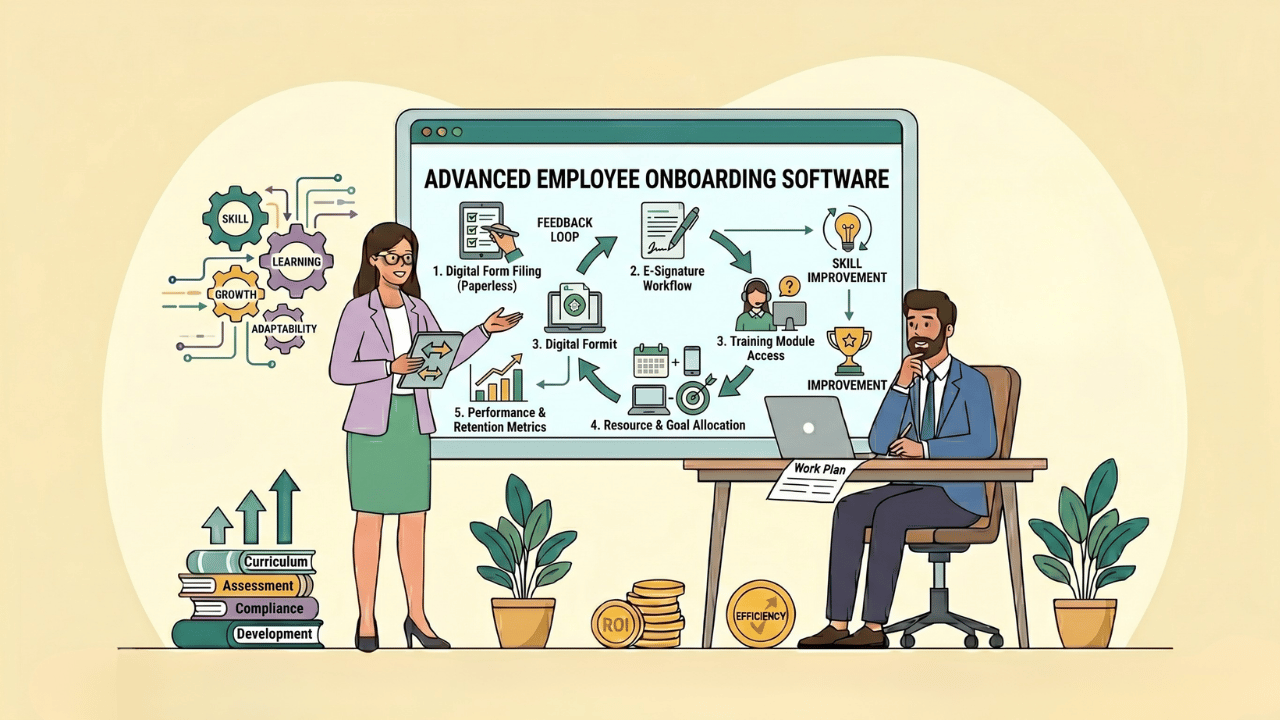
Employee onboarding software is a tool that automates and structures the process of bringing a new hire into a company. It handles the paperwork, the training tasks, the introductions, and the check-ins, so onboarding runs as a planned process instead of a scramble of emails and forms.
I've onboarded people both ways: with software and without it. Without it, the first week is a person sitting at a desk waiting for a laptop while someone hunts down a tax form. With it, day one has a plan, and the new hire can see it.
This guide covers what onboarding software actually does, the numbers that justify it, and a step-by-step way to choose and roll one out. The key statistics are included throughout.
What Does Employee Onboarding Software Do?
It turns onboarding from a checklist in someone's head into a system. At its core, the software gives every new hire a structured path and gives HR a way to see who is where in that path.
The common features:
- Digital paperwork and e-signatures so tax forms, contracts, and policy acknowledgments are done before day one
- Onboarding checklists and task workflows that assign the right task to the right person at the right time
- Automated reminders so nothing falls through the cracks
- A new-hire portal where the employee sees their schedule, documents, and team
- 30-60-90 day plans that extend onboarding past the first week
- Reporting on completion rates and time to productivity
The simplest way to think about it: the software is the difference between hoping onboarding happens and knowing it did.
Why Does Onboarding Software Matter? The Statistics
Because onboarding is one of the highest-return moments in the employee lifecycle, and most companies do it badly. The data on both points is hard to ignore.
A few numbers worth keeping in mind:
- A strong employee onboarding process can improve new-hire retention by as much as 82% and boost productivity by more than 70%.
- Gallup found that only about 12% of employees strongly agree their organization does a great job of onboarding. The other 88% are being set up to struggle.
- Candidates who go through an exceptional onboarding are roughly 2.6 times more likely to feel happy in their job and stay.
- Replacing an employee costs between 50% and 200% of their annual salary, per SHRM. A weak first 90 days is one of the most expensive mistakes a company can make.
Put those together. Onboarding strongly predicts retention, most companies onboard poorly, and the cost of someone leaving early is enormous. Software doesn't fix culture, but it removes the structural reasons a good onboarding plan falls apart in practice.
What's the Difference Between Onboarding Software and an ATS?
They're related but they cover different stages of the hiring process. An applicant tracking system manages candidates up to the point of hire. Onboarding software manages the person after they accept.
Here's how the two compare:
| Factor | Applicant tracking system | Onboarding software |
|---|---|---|
| Stage | Sourcing to offer accepted | Offer accepted to fully ramped |
| Main user | Recruiters and hiring managers | HR, IT, the new hire's manager |
| Core job | Find, screen, and hire candidates | Set up and integrate the new employee |
| Key output | A hired candidate | A productive, retained employee |
The best setup is when the two connect. Modern hiring platforms increasingly include onboarding as a module, so a candidate's data flows straight into onboarding without anyone retyping it. The benefits of an AI applicant tracking system extend here: one connected system means the handoff from candidate to employee is smooth instead of a fresh data-entry job.
How to Choose Employee Onboarding Software: A 7-Step Plan
Buying the wrong tool is expensive and slow to undo. Here's the process I'd run.
Step 1: Map your current onboarding first
Don't shop for software before you understand your own process. Write down every step a new hire goes through today, from offer acceptance to the 90-day mark.
For each step, note what's manual, what's slow, and what gets skipped. That list is your requirements document. Buying software to automate a broken process just gives you a faster broken process.
Step 2: List your must-have features
Separate what you need from what's nice to have. For most teams the non-negotiables are digital paperwork, task workflows, automated reminders, and reporting.
Then add what's specific to you. If you hire across countries, you need multi-region compliance. If you hire hourly staff in volume, you need a mobile-first experience. If you hire remotely, the remote onboarding experience has to be excellent, because there's no office to carry it.
Step 3: Check how it integrates
Onboarding software that doesn't connect to your other systems creates new manual work instead of removing it.
Check that it integrates with your applicant tracking system, your HRIS or payroll, and your IT provisioning. The goal is one flow of data: the person is hired once, and every system updates from that.
Step 4: Test the new-hire experience, not just the admin view
Most demos show you the HR dashboard. That's the wrong screen to judge it on.
Ask to see exactly what the new employee sees on day one. If it's confusing or ugly to them, the software is failing at its actual job. The new hire is the real user.
Step 5: Compare pricing on total cost
Look past the per-employee sticker price. Ask about implementation fees, integration costs, support tiers, and what happens to pricing as you grow.
A cheap tool with a painful setup and weak support can cost more than a pricier one that works on day one.
Step 6: Run a real pilot
Before you commit company-wide, run the software through one full onboarding cycle with a small team. A demo is a sales environment. A pilot is reality.
Watch where new hires get stuck and where managers ignore the tool. Those are the problems you'd otherwise discover at scale.
Step 7: Plan the rollout and train managers
The software will not onboard anyone by itself. Managers still own the human side: the welcome, the early wins, the check-ins.
Roll it out with clear guidance on who does what. The tool handles the process; the manager handles the person. Treat that as part of the wider recruitment process, since onboarding is the last stage of hiring, not a separate event.
What Features Should Good Onboarding Software Have?
The best tools share a set of features that map directly to a strong onboarding experience.
- Preboarding, so engagement starts between offer and day one rather than going cold
- Digital documents and compliant e-signatures, including region-specific forms
- Role-based task workflows, since IT, HR, and the manager all have different jobs
- A clear new-hire portal, the employee's window into their first weeks
- 30-60-90 day planning, because onboarding is a quarter, not a week
- Automated check-ins and surveys, to catch a struggling hire early
- Analytics, so you can see completion rates and time to productivity
If a tool nails preboarding, the portal, and reporting, it's covering the parts that matter most. Everything else is refinement.
How Do You Measure Onboarding Software Success?
You measure it by whether new hires ramp faster and stay longer, not by whether the software was installed.
The metrics I'd track:
- Time to productivity, how long until a new hire performs at full capacity
- 90-day and first-year retention, the clearest signal onboarding worked
- Onboarding completion rate, whether tasks actually get finished
- New-hire satisfaction, from a survey at 30 and 90 days
- Manager and HR time saved, the efficiency case for the tool
- Cost per hire, since faster ramp and better retention both lower it
A good benchmark is comparing your numbers before and after the tool. If retention and time to productivity don't move within two or three hiring cycles, the problem is the process, not the software.
How Does Onboarding Software Affect Retention and Employer Brand?
Strongly, and in both directions. A new hire's first weeks shape whether they lean in or quietly start looking. Structured onboarding removes the chaos that pushes good people away early.
It also shapes candidate experience in reverse. Onboarding is the moment a candidate's experience becomes an employee's experience, and a smooth transition confirms the company is as organized as it claimed during hiring.
That follows through to your employer branding. People talk about their first week. A new hire who felt welcomed and set up will say so, and that word-of-mouth is worth more than any careers-page copy. Onboarding software also supports collaborative hiring by keeping the manager, HR, and IT working from the same plan instead of separate inboxes.
What Mistakes Do Companies Make With Onboarding Software?
Buying the tool is the easy part. I've seen plenty of companies own good software and still onboard badly. The mistakes are predictable.
- Treating the software as the whole job. The tool handles paperwork and tasks. It cannot welcome someone, answer their nervous questions, or make them feel they belong. A manager still has to do that. Software plus an absent manager is still a bad first week.
- Automating a broken process. If your onboarding was disorganized on paper, digitizing it just makes the disorganization faster. Fix the process first, then buy software to run it.
- Stopping at day one. Many tools get used hard for the first day and then forgotten. Onboarding is a 90-day process. If the software isn't carrying the 30, 60, and 90-day plan, half its value is unused.
- Ignoring preboarding. The gap between offer and start date is when a new hire is most anxious and most likely to accept a counteroffer elsewhere. Software that does nothing in that window wastes its best opportunity.
- Skipping the new-hire view. Companies configure the HR dashboard carefully and never check what the employee actually sees. The employee is the real user. A confusing portal undoes the point of the tool.
- No owner. When onboarding software belongs to nobody, it drifts. Tasks go stale, content gets outdated, and within a year people work around it. Someone has to own it.
The honest summary: onboarding software removes the structural reasons a good plan fails, like lost paperwork and forgotten tasks. It does not create a good plan, and it does not replace the human side. The companies that get real value treat the tool as the backbone and the manager as the heartbeat.
Frequently Asked Questions
What is employee onboarding software?
It's a tool that automates and structures the process of bringing a new hire into a company, handling digital paperwork, task workflows, training plans, and check-ins so onboarding runs as a planned process rather than an improvised one.
Is onboarding software the same as an ATS?
No. An applicant tracking system manages candidates up to the point of hire. Onboarding software manages the person after they accept. Many modern platforms include both, so data flows straight from hiring into onboarding.
How much does employee onboarding software cost?
Pricing is usually per employee per month, but the real cost includes implementation, integrations, and support. Compare total cost of ownership rather than the sticker price, and ask how pricing changes as your headcount grows.
Does onboarding software improve retention?
It supports retention by removing the structural failures that ruin a new hire's first weeks. Strong onboarding can improve new-hire retention by as much as 82%, and software is what makes a good onboarding plan happen consistently.
What features matter most in onboarding software?
Preboarding, compliant digital paperwork, role-based task workflows, a clear new-hire portal, 30-60-90 day planning, automated check-ins, and analytics. Integration with your ATS and HRIS is just as important as the features themselves.
Can small businesses use onboarding software?
Yes. Small teams often gain the most, because they rarely have a dedicated onboarding specialist. The software acts as that missing structure. Look for a tool that's quick to set up and doesn't require an implementation project.
How long does it take to implement onboarding software?
It varies from a few days for a simple, standalone tool to several weeks for one with deep HRIS and payroll integrations. Run a pilot with one team before a company-wide rollout to surface problems early.
What is preboarding and why does it matter?
Preboarding is the engagement that happens between offer acceptance and the first day. It matters because that gap is when a new hire is most anxious and most likely to accept a counteroffer elsewhere. Good onboarding software keeps the new hire connected during this window.
Does onboarding software replace the manager's role?
No. The software handles paperwork, tasks, and reminders. It cannot welcome a person, answer their questions, or make them feel they belong. The manager still owns the human side. The tool is the backbone; the manager is the heartbeat.
.jpg)
.png)

.webp)